ClickUp 4.0 Explained: What’s New, What’s Different, Is It Worth It
.png)

.svg)
Project management software rarely matures in ways that materially impact how organizations operate. Most releases introduce incremental improvements. ClickUp 4.0 represents something different. Rather than adding surface-level features, this release refines the underlying infrastructure, strengthens governance, and integrates intelligence directly into workflows.
For organizations that treat operational structure as a competitive advantage, this update deserves careful evaluation.
This article examines what changed in ClickUp 4.0, how it differs from previous versions, whether it costs more, and why it may warrant a switch from another project management system.
What’s New in ClickUp 4.0?
ClickUp 4.0 focuses on performance maturity, embedded AI, workload clarity, and structural governance. The improvements are not cosmetic. They address long-standing friction points experienced by teams operating at scale.
Performance That Supports Complex Workspaces
Earlier versions of ClickUp were powerful but occasionally felt heavy in large environments. Teams managing layered dashboards, thousands of tasks, and cross-functional dependencies sometimes experienced latency that disrupted workflow momentum.
ClickUp 4.0 prioritizes infrastructure stability and speed. Task views load more efficiently. Navigation between Spaces and Lists feels immediate. Dashboard refresh rates are more consistent in high-volume workspaces. These refinements reduce cognitive friction and increase adoption across departments.
ClickUp details these improvements in its official product updates and release notes, where the 4.0 release emphasizes quality and structural refinement.
Performance may sound technical, but it has strategic implications. When a system feels responsive, it becomes the default environment for execution. When it feels slow, teams migrate to email, spreadsheets, or chat threads. ClickUp 4.0 strengthens its position as an operational hub rather than a supplementary tool.
AI Integrated Into Core Workflow
Artificial intelligence in ClickUp 4.0 is embedded into task creation, documentation, and collaboration rather than positioned as a standalone feature. The platform can generate structured task descriptions from brief prompts, summarize meeting notes into actionable items, convert discussions into subtasks, and reformat written content for clarity.
The practical impact is administrative efficiency. Teams spend less time formatting information and more time executing against it. Leadership discussions can be translated into structured deliverables within minutes rather than hours.
ClickUp outlines AI functionality and use cases on the ClickUp AI overview page. Organizations should note that advanced AI capabilities may require an add-on depending on the subscription tier.
Improved Workload and Capacity Visibility
Execution failures often stem from overcommitment rather than poor strategy. ClickUp 4.0 strengthens workload visibility by clarifying how assignments, deadlines, and capacity intersect.
The enhanced Workload View enables leaders to assess whether teams are operating within realistic bandwidth constraints. Rather than relying on anecdotal feedback, decision-makers can evaluate capacity data in real time.
ClickUp’s Workload View documentation explains how capacity tracking functions within the platform. This capability shifts ClickUp from a task repository to a planning and forecasting environment.
Governance Without Compromising Flexibility
ClickUp has always been highly customizable. However, flexibility without guardrails can lead to structural inconsistency, redundant automations, and disorganized hierarchies.
ClickUp 4.0 improves permission clarity, template consistency, and overall UI coherence. These refinements make the platform more enterprise-ready while preserving customization depth. Teams can design workflows suited to their departments without sacrificing centralized oversight.
For organizations operating in regulated industries or scaling across multiple departments, governance maturity is as important as feature depth.
What You Can Accomplish With ClickUp 4.0
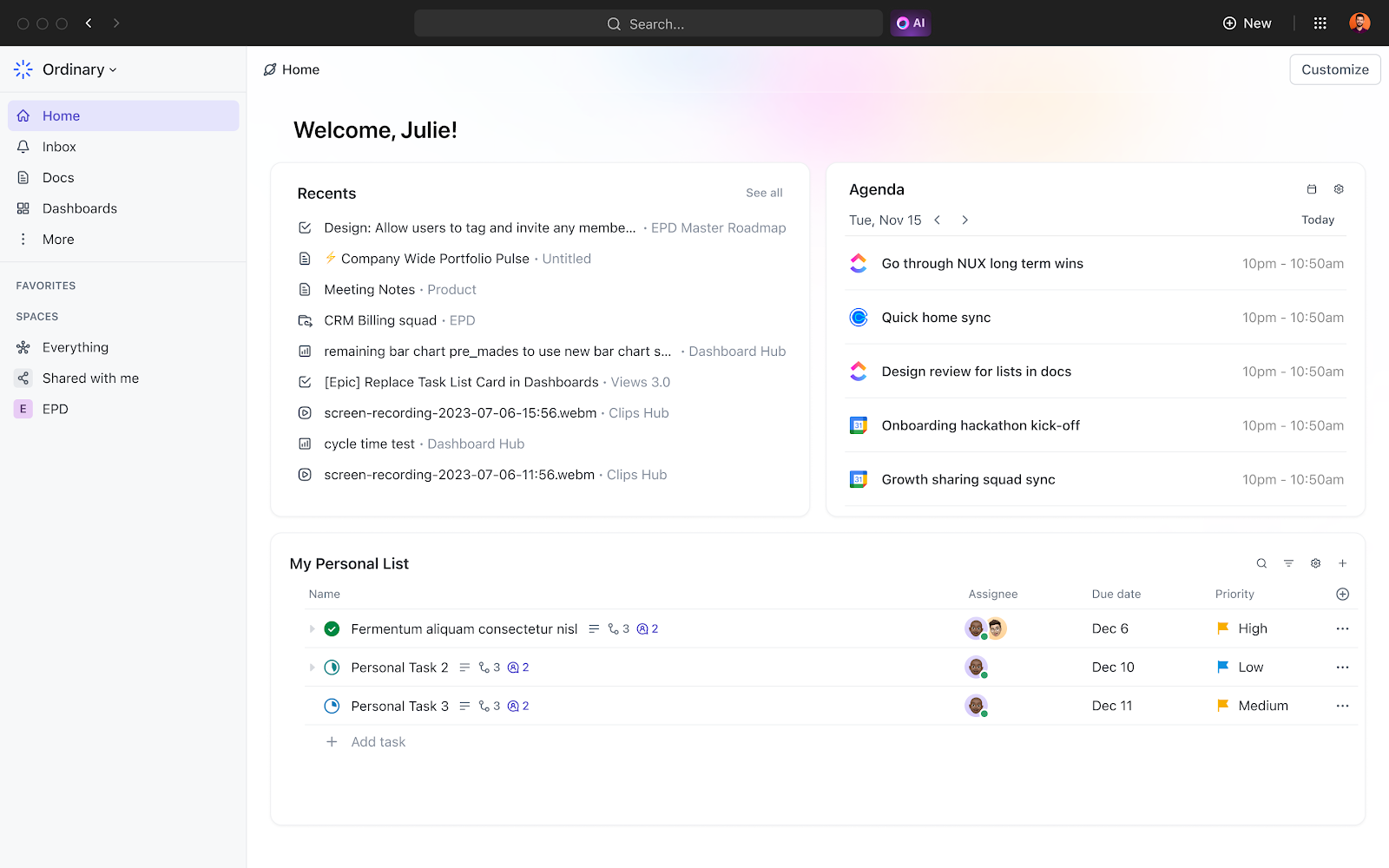
ClickUp 4.0 is designed to consolidate operational tools into a unified environment. The implications differ depending on role and organizational structure.
Marketing teams can manage campaign roadmaps, content pipelines, SEO initiatives, and paid media execution within a single structured workspace. Goals connect directly to task completion, enabling leadership to evaluate whether execution aligns with quarterly objectives.
Operations teams can document and automate recurring processes such as onboarding, reporting cycles, and compliance workflows. Templates standardize execution while dashboards provide oversight into bottlenecks and dependencies.
Executive leadership gains portfolio-level visibility without micromanagement. Strategic objectives, capacity planning, and project tracking coexist in one environment, reducing reliance on fragmented reporting systems.
For advanced users building layered automations or multi-client structures, ClickUp 4.0’s performance improvements and governance tools enhance scalability. A practical example of structured, high-level implementation can be found in this analysis of what it feels like to be a ClickUp power user, which explores how disciplined architecture transforms the platform into an operational command center.
Does ClickUp 4.0 Cost More?
ClickUp 4.0 is not a separate product tier. It represents the evolution of the existing platform. Core performance upgrades and interface refinements are included within active subscriptions.
Advanced features such as AI functionality, higher automation limits, and enterprise-grade controls may depend on subscription tier. Organizations should review the ClickUp pricing page to evaluate plan-specific inclusions.
The key distinction is that 4.0 itself does not require a separate upgrade purchase. Cost considerations relate to feature depth rather than version access.
How ClickUp 4.0 Differs From Previous Versions
The most significant distinction between ClickUp 4.0 and earlier iterations is cohesion. Previous versions offered extraordinary flexibility but required deliberate architectural discipline to prevent complexity.
ClickUp 4.0 reduces structural friction. Performance enhancements make large environments sustainable. AI integration shortens the distance between conversation and execution. Governance improvements mitigate organizational sprawl.
Instead of functioning as an adaptable toolkit, ClickUp 4.0 operates more like a unified operating system for work. This shift matters for organizations that view process design as infrastructure rather than convenience.
Why Consider Switching From Another Project Management System?
Migration is disruptive. The decision to switch must be strategic rather than reactive.
ClickUp 4.0 differentiates itself through consolidation. Many teams rely on separate tools for tasks, documentation, dashboards, whiteboards, and lightweight CRM functions. Each additional platform introduces integration overhead and subscription cost. ClickUp’s unified environment reduces fragmentation.
Customization depth also minimizes the risk of outgrowing the platform. Whereas some systems impose rigid structures, ClickUp allows departments to design workflows suited to their operational realities while remaining within a centralized framework.
Strategic alignment is another differentiator. Goals, dashboards, workload visibility, and task management coexist in one environment. This linkage between execution and measurable objectives is often absent in simpler task management tools.
Finally, embedded AI reduces administrative drag. Rather than layering third-party automation on top of existing processes, ClickUp integrates intelligence directly into the workflow.
For organizations seeking consolidation, scalability, and strategic alignment, the switch may represent structural improvement rather than feature replacement.
Strategic Implications: What ClickUp 4.0 Signals
ClickUp 4.0 signals maturation. The release prioritizes stability, intelligence, and governance over novelty. It reinforces the platform’s ambition to function as an operational backbone rather than a task list.
Organizations that treat project management software as a checklist tool may perceive incremental change. Organizations that rely on structured execution, measurable alignment, and scalable systems will recognize the strategic refinement.
The question is not whether ClickUp 4.0 introduces new features. The question is whether your operational infrastructure is positioned to leverage them.
Frequently Asked Questions About ClickUp 4.0
Is ClickUp 4.0 a separate platform?
ClickUp 4.0 is an evolution of the existing environment rather than a distinct product. Core data structures remain intact. The enhancements focus on performance, governance, and AI integration rather than migration to a new ecosystem.
Will current automations and workflows continue functioning?
Existing workflows and automations generally remain operational. The update enhances structural clarity and infrastructure performance rather than removing legacy capabilities. Organizations with highly customized environments should review configurations to ensure optimal alignment with updated governance controls.
Can small teams benefit from ClickUp 4.0?
Yes. Smaller teams gain consolidation benefits by housing documentation, tasks, dashboards, and AI within a single subscription. Larger organizations benefit from capacity visibility and structured governance. The platform scales according to architectural intent.
How does ClickUp 4.0 compare to other platforms such as Asana, Monday, or Notion?
Many platforms specialize in a specific function. Some prioritize visual workflow tracking. Others emphasize documentation or simplicity. ClickUp 4.0 differentiates itself by integrating task management, documentation, goals, dashboards, automation, and AI into one environment. For organizations prioritizing consolidation over specialization, this unified architecture is a primary advantage.
Is AI included in all plans?
Core platform improvements are included in existing subscriptions. Advanced AI functionality may require an additional add-on depending on the tier. Subscription details are outlined on the pricing page referenced above.
Is it worth switching if your current system meets basic needs?
If your existing platform supports strategic alignment, scales without friction, and provides clear workload visibility, switching may not be urgent. However, if fragmentation, limited customization, or lack of executive oversight constrain growth, ClickUp 4.0 offers structural advantages that may justify migration.

.png)
.png)